Hewlett Packard Enterprise recently started transitioning their support offerings from HPE Foundation Care and Proactive care to HPE Pointnext Tech Care. This new service goes beyond problem identification and resolution by helping customers get the most from their HPE technology. New innovations include fast multi-channel access to product-specific experts, an AI-driven digital experience, and general technical guidance to help customers achieve operational efficiency.
Standard features of the HPE Pointnext Tech Care experience
Product-Specific Expertise
Gone are the days of navigating complex escalations. With HPE Pointnext Tech Care, you get fast access to experts who specialize in the specific product you need support on. You can also benefit from HPE-assisted forums for community sharing, best practices and answers to common questions. And HPE’s library of hundreds of videos and configuration guides developed by HPE engineers will help to enable quick self-resolution of many issues.
General Technical Guidance
With HPE Pointnext Tech Care, you can gain expert technical advice for the operation and management of your products. Our experts augment skills gaps on your teams and can help your staff leverage best practices based on a knowledge base of thousands of other IT organizations. You have the freedom to engage experts beyond break fix by talking to an expert to brainstorm how to do things better, and by leveraging best practices and approaches to common issues.
AI-Driven Digital Experience
HPE Pointnext Tech Care delivers a data-driven and modern customer experience, featuring a powerful AI-based virtual agent, personalized task alerts and self-serve digital case management. The experience is optimized by the data coming from your HPE products, helping you to take action as quickly as possible. Streamline contract and warranty management by receiving faster and more complete visibility of your services and what resources are available to you. And HPE’s unique Visual Remote Guidance augmented-reality support can help on-site staff work with remote experts to get to solutions faster.
Pointnext Tech Care Support Offerings
Regardless of your coverage window, incidents with covered hardware or software can be reported to HPE via telephone, web portal, chat, or forums as locally available. An automated equipment reporting event uses HPE electronic remote support solution 24 hours a day, 7 days a week.
For HPE products covered by HPE Pointnext Tech Care, HPE offers three service levels tailored to the Customer’s operational requirements:
Basic
- 2-hour response 9×5 (standard business hours) Next business day on-site attendance
Essential:
- 15-minute response 24×7 for severity 1 incidents (direct connect to product specialist where available)
- 24×7 4-hour on-site attendance
Critical:
- 15-minute response 24×7 for severity 1 incidents (direct connect to product specialist where available)
- Outage management for severity 1 incidents
- 24×7 6-hour hardware repair commitment (where applicable)
Optional features include
- DMR (Defective media retention)
- CDMR (Comprehensive Defective media retention)
- Preventive maintenance (only with HPE contractual services)
- Hardware Exchange Service
All service levels provide 24×7 access to online self-serve and self-solve capabilities and 24×7 incident logging. For supported devices, 24×7 HPE InfoSight analytics and automated incident submission are available.
HPE Pointnext Complete Care
HPE Pointnext Complete Care is a modular, edge-to-cloud IT environment service. It provides a holistic approach to optimizing your entire IT environment. It works to achieve agreed upon IT outcomes and business goals through a personalized and customer-centric experience. All delivered by an assigned team of HPE Pointnext experts.
For assistance with selecting current support, please see the guide, below:
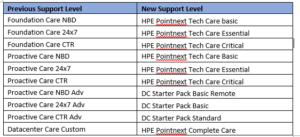
Our Renewals and Professional Services Team at Zunesis is available to assist you. We identify the best service level and options for your unique environment. If you are a current Zunesis customer, we will notify you within 30-90 days of support expiration. We will assist in helping you select a customized service level to meet your support requirements. Contact Zunesis with any questions you may have.
Microsoft Product Life cycle
A typical Microsoft product life cycle lasts 10 years from the date of the product’s initial release. The end of this life cycle is known as the product’s end of support. This means Microsoft will no longer provide updates or support of any kind.
End of support can result in vulnerabilities that impact your infrastructure and data.
End of Support
Mainstream support for Exchange Server 2010 ended in January 2015. Per standard practice, Microsoft’s extended support ends five years after mainstream. The original end of support date was in line with the end of support for Windows 7 and Windows 2008 server. This occurred on January 14, 2020. However, to allow businesses time to complete their migrations, it was extended to October 13, 2020.
Mainstream support for Office Suite 2010 is also ending on October 13, 2020. This leaves approximately 3 months to find the right path for your organization and implement the migrations.
End of Support Implications
- So Long Security Updates – Critical components like bug fixes and security patches that protect users and data will discontinue. Without these updates, the risk of ransomware or malicious attempts to access information rises.
- No More Support – The first thing Microsoft support will tell you when you attempt to open a new case is, sorry, that version is no longer supported. We cannot help.
- Goodbye Support Documentation Updates – While existing articles will still be available, new best practices and guidance will no longer continue to be published for those versions.
- Hello Compliance Issues – Running outdated or unsupported products can be an immediate ticket out of compliance. If your industry or regional standards are dependent on regulations, you may be introducing a legal problem if you stay put.
- No More Bug Fixes – With the discontinuation of bug fixing, you can expect to see the introduction of stability and usability issues.
- Accept Risks with Unsupported Versions – There are risks of downtime and productivity loss from server failure. It could end up costing you money in addition to headaches.
What will happen on October 14, 2020?
If you are on these versions of Microsoft software, they will continue to run. However, there will be some very good reasons to be concerned when staying on these platforms:
- Compatibility – Assuming you’re Exchange Server 2010 is running on a compatible Microsoft Windows Server OS, updates to the OS may not be compatible with Exchange Server 2010. Making it very possible that an OS update could cause Exchange Server to cease to function. So, you will be limited to what updates you can install from the OS perspective.
- Security – Vulnerabilities are discovered and released daily. After October 13, Microsoft will not release security patches to address the new vulnerabilities for Exchange Server 2010 and Office Suite 2010. This means a new vulnerability may or may not work in Exchange Server 2010 or Office Suite 2010. Microsoft will not care. Be sure that the cybercriminals will be testing out the new vulnerabilities on the older versions.
- Compliance – New government regulations around protecting data are getting specific around what kinds of IT controls need to be in place. For example, PCI requirements state “Ensure that all system components and software are protected from known vulnerabilities by having the latest vendor-supplied security patches installed. Deploy critical patches within a month of release.”
Options – Exchange Server 2010
- Migrate to Exchange Online (Office 365) – This is the preferred path by most organizations. By upgrading to Office 365, you have the latest version of Exchange in addition to all the functionality, collaboration, and applications without maintaining on-premises hardware.Microsoft provides one of three types of migration scenarios:
1. Cutover: (for smaller orgs) Where everything is migrated and on-prem services are shut down.
2. Minimal Hybrid: Similar to cutover, but when you have so many mailboxes you need a bit of time but without any of the hybrid environment features.
3. Full Hybrid: Where you have lots of mailboxes and need to be hybrid for an extended period of time while you migrate. This is also clearly the preferred option from Microsoft’s end.
From feature enhancements to recent announcements of price hikes for on-prem software, Microsoft continues to push organizations off-premises and into the cloud suite. Support is available for all of Microsoft’s cloud offerings.
- Remain On-Premises and Migrate to a Supported Version of Exchange – Moving email to the cloud may not be possible for business reasons. By migrating to a newer instance of Exchange, your organization has protection against the implications of an out-of-date server. Microsoft has 3 versions of Exchange Server remaining under support after October 13, Exchange Server 2013, 2016, and 2019. All are viable choices to remain on-prem (Exchange Server 2013 is slated for end of support 4/2023). Microsoft recommends at least Exchange 2016 as 2013 has limited functionality compared to Office 365. Keep in mind, there is no upgrade path for Exchange Server. A new Exchange environment will need to be stood up. Then a migration occurs to move the mailboxes and data. Support is not available with Microsoft’s on-prem offerings.
Whichever option one chooses, the plan should be simple and effective.
- Decide on a path – Determine whether to update to a newer version of Exchange Server or move to Office 365 (or another platform if desired).
- Assess Mailbox Usage – How many mailboxes and how much space are they taking up?
- Determine Migration Strategy – whether on-prem or cloud.
- Assess Archive Options – will archiving help depending on length of time email has been around and the amount of space.
- Archive – archive any data fit for archiving
- Migrate – whether on-prem or cloud.
Options – Office Suite 2010
Microsoft has also been making a push to Office 365 here as well. There are fewer feature updates and enhancements for Office Suite 2019. A recent 10 percent price hike has occurred. It has a shorter extended support life than prior versions of Office Suite.
Both versions of Office Suite 2019 (Cloud or On-Prem) require Windows 10.
Migrate to Office 365
- Subscription based service with a license tied to a subscription few based on the amount of users
- Upgrade options with a variety of available plans to tailor usage to user needs.
- Regular feature updates to keep current with Office features, tools, and bug fixes alongside security updates to keep protection up to date and safe from hackers.
- Built in cloud storage capabilities with Microsoft OneDrive.
- Support window that will exist as long as the Office Suite does.
Remain On-Premises and upgrade to Office Suite 2019
- One-time purchase sold on a per computer perpetual license.
- No upgrade options for future releases.
- No feature updates from initial release.
- Security updates to keep protection up to date and safe from hacking.
- Five-year support window that ends in 2025.
Conclusion
Office Exchange Server 2010 and Office Suite 2010 end of life is an inevitability all users must face. With a little less than 3 months remaining, now is the perfect time to figure out which of Microsoft’s options are best. Then, start the groundwork for migration. Deciding whether Office 365 is right for your organization will depend greatly on your needs. Whatever your requirements, making an informed decision will ensure an ease of transition and applications that are optimal for use.
Contact Zunesis for an assessment on what Microsoft option is best for your organization.
Most organizations choose basic, enhanced, or premium support for the first three years of a hardware purchase. It is standard operating procedure for many IT organizations to purchase the warranty coverage alongside new hardware. However, these services can be added at any time via custom support contracts with your vendor.
Hardware Warranty vs. Business Support
Whilst the hardware warranty may sound attractive, does it meet the needs of your business? A warranty only provides hardware support if a product or component is found to be faulty, within a certain period. There are no guaranteed response times, time-to-repair commitments, or software support.
While the warranty guarantees replacement of the faulty product or component, what will be the impact on your business when a hardware malfunction occurs? For example, if your storage is configured for high availability with RAID, will you be able to wait for a replacement disk to be shipped to you? If your business depends on the technology or you are experiencing downtime—can your business afford to wait?
In addition, when a warranty replacement part does arrive, there may be no technical expertise provided, no installation and configuration assistance, and no commitment to return the system to the level of functionality and performance your business requires.
Is that what you’re looking for? Or does your business demand something better? Business support is available to help maintain your IT infrastructure along with your hardware warranty.
HPE Pointnext services are designed to allow you to concentrate on delivering business outcomes, relieving you from having to focus on maintaining your IT infrastructure. We offer various options that allow you to choose the support that’s right for your IT, your budget, and your business.
If you’re currently relying only on hardware warranties, why not take a look at the following operational services, and see how they can make a difference to your business.
- HPE Foundation Care is designed to keep your devices up and running, with HPE experts available to assist when there is a problem. Foundation Care reduces the amount of time your IT team needs to troubleshoot, monitor, and remediate your HPE servers, storage, networking products, and commercial operating systems and hypervisors, while maintaining required levels of availability within budget and resource limitations.
- HPE Proactive Care allows you to focus on your business by providing proactive, higher-value support that helps improve the overall availability and stability of your IT systems. Your entire infrastructure stack is supported with services designed to reduce the number of issues you experience and rapidly resolve problems should they occur.
- HPE Proactive Care Advanced (PCA) offers even more value with the addition of an assigned local Account Support Manager (ASM), providing access to specialist technical resources who can offer tailored advice and share best practices to help optimize your IT operations. Should you experience a complex incident or downtime, HPE will assign a Critical Event Manager (CEM) to manage, monitor, and coordinate the end-to-end process—providing prompt and effective engagement of additional expertise if required—to ensure the fastest possible problem resolution. With systems running smoothly, your staff can focus on new projects and strategic business initiatives.
Your devices are connected to HPE for 24×7 monitoring, providing you with a view of your IT from anywhere and on any device. Data received is scrutinized and a meaningful, tailored analysis provides proactive recommendations for firmware and patch updates. Plus when devices are connected, pre-failure alerts are sent to help you avoid outages. Calls can be automatically logged and parts dispatched to replace defective components—often before you’re even aware of the problem!
Benefits of Support Contracts
Renewing support allows your IT organization to effectively plan and budget, while ensuring your support coverage does not lapse, and helps to avoid late renewal charges. It also allows you to keep your systems up to date with current upgrades.
Another benefit is the consolidation of renewal dates. As your IT environment continues to grow, Zunesis can help make the renewal process simpler and easier by consolidating renewal contracts and expiration dates, reducing the number of contracts and administrative costs.
If you are a current Zunesis customer, once your initial support contract is due to expire, Zunesis will notify you within 30-90 days of support expiration, and, assist in helping you select a renewal contract to meet your current support requirements.
As the dedicated Support Specialist for Zunesis, I’d be happy to work with you to review your existing environment, and to develop a plan to ensure that you have the confidence your equipment has the protection necessary to survive in today’s demanding IT world.
