Microsoft Office is a product everyone knows, and it has been a household name for decades at this point. Office 365 is the slightly lesser well-known cloud version of office. It was a massive step forward for Microsoft at its release.
Over the past 8 or so years, Microsoft has been fine-tuning the suite, adding features and entirely new programs as they go. This has resulted in the powerhouse of productivity we know today. While moving everything in your organization to the cloud may not be a great idea, this is one area where the cloud is almost universally a good idea for all companies.
You already know all the programs
The core programs included in Office 365, such as Word and Excel, are the same programs people have been using for years. It’s the same programs you used 20 years ago to write a paper, create a cover letter, and give a presentation. You can access these programs online without downloading anything. You can also install the desktop versions and work in the same manner you always have.
Work anywhere
One of the biggest advantages to Office 365 is the ability to work from anywhere, on any device. If you have an internet connection, you can access everything you need to continue working. This is especially great for people who travel a lot or use multiple devices. Just log into the web portal, and all your documents and files are ready to go.
Collaborate easily
If you have multiple people accessing the same file multiple times a day, this is where Office 365 really shines. Everyone who needs to edit a document can work on the same version. Rather than having multiple versions, or having to wait until a coworker closes the document, it’s accessible at anytime.
You can see real time changes without having to reload the file. You have the capability to share your documents directly with others. This eliminates the need to send the document as an email attachment. Sharing directly also enhances security. Office 365 allows you to set permissions so you can be sure its only shared with the people you want.
Communicate easily
With the addition of Skype and Teams, Office 365 makes it easy to manage projects and communicate with your team members. It has integrated video calls and screen sharing into its easy to use programs. You can create conference calls, do remote presentations, and even use your computer as your phone.
Don’t worry about updates
Office 365 will always keep your programs up to date. You will never have to worry about making sure you have the latest version. Everyone in the company will be on the same version so you won’t run into mismatches either.
Subscription based and pay-as-you-go
Office 365 is subscription based, which can lower the investment your company needs to make to get started. You only need to pay for licenses you use. You can add and remove licenses at any time. Adding and removing employees is simple. You will no longer have unused licenses just laying around. Since everything is tied to a central admin portal, there are no more license keys to worry about.
Easy to use admin portal
Speaking of the central admin portal, Microsoft has been designing Office 365 to make it easy to use, even for non-technical employees. You can perform most administrative tasks from the portal, without the need for an in-house IT department. Microsoft’s support options are also integrated in the portal, so you have everything you need, even if you run into a problem.
Security features
Office 365 has everything from spam filters for email, to data loss prevention cloud saves for documents. Even if you are in the middle of working on a document and your computer explodes into a million pieces, you will be able to log into your account from another machine and resume right where you left off. Office 365 offers many security features like email encryption, mobile device management, and email recovery.
Microsoft has been working hard to streamline daily office tasks for businesses. From collaboration, to file sharing, to communication, Office 365 makes it all very easy. Add the fact that it is being constantly updated with new features, bug fixes, and more robust security, its easy to see why Office is the giant that it is, and the cloud features of Office 365 only makes it better.
Why Choose Microsoft Office 365?
There are thousands of blog articles written about Office 365 each year. Here are just a few: Top 10 Reasons to Migrate to Office 365, Top 10 Reasons to Not Migrate to Office 365, Top 10 Migration Strategies for Office 365, Top 10 Office 365 Myths Debunked, and 15 Cool Features You Should Be Using in Office 365. Not to mention endless technical and how-to articles. There is no shortage of opinions in support of or against utilizing Office 365, everyone seems to have one.
While researching the topic of this blog article, I read many of these arguments that organizations view when deciding if Office 365 is right for them. When focusing on the reasons to migrate to Office 365, the articles list the reasons with a short explanation of each reason. No matter the reason, the explanation is usually a quick blurb with a justification for moving to Office 365. There is usually very little information to back up the justifications.
Are Blurbs Enough?
For example, when discussing storing data in Office 365:
If our data moves to the cloud, our business will no longer have control over our technology:
When you move to the cloud, your business actually gains control over your technology by reducing time and money spent maintaining hardware and upgrading software. Now you and your team can focus on strategically implementing technology for your business rather than being a repair service. You will reduce expenditures to your capital budget by no longer relying on servers to store email and workloads. Instead, you can expect a predictable budget and focus on supporting your business in a much more agile fashion, with the ability to respond to needs quickly.
Wow, that is a lot in a tiny blurb. If you started out with a less than stellar email system which was needing repaired constantly, or your business does not require any other servers, you are in great shape.
Or:
Office 365 is more than just Word, Excel, etc.
It is (depending on your license) actually a hosted Exchange (email) server. Now, one of the most powerful email systems that used to be only for Fortune 500 corporations, can be accessed by even the smallest of small businesses. Enterprise-level features and reliability for pennies per day!
True on every level, but pennies per day? No other quantification?
Clarification, Please!
A little clarification would be great when explaining to your boss why you should move to Office 365. They no doubt are going to ask you to explain the pennies per day, or other explanations in these tiny blurbs.
Hopefully, the rest of this article can be of specific help. Sorry for the Reason – blurb format.
Where is customer (your organization) data when in Office 365?
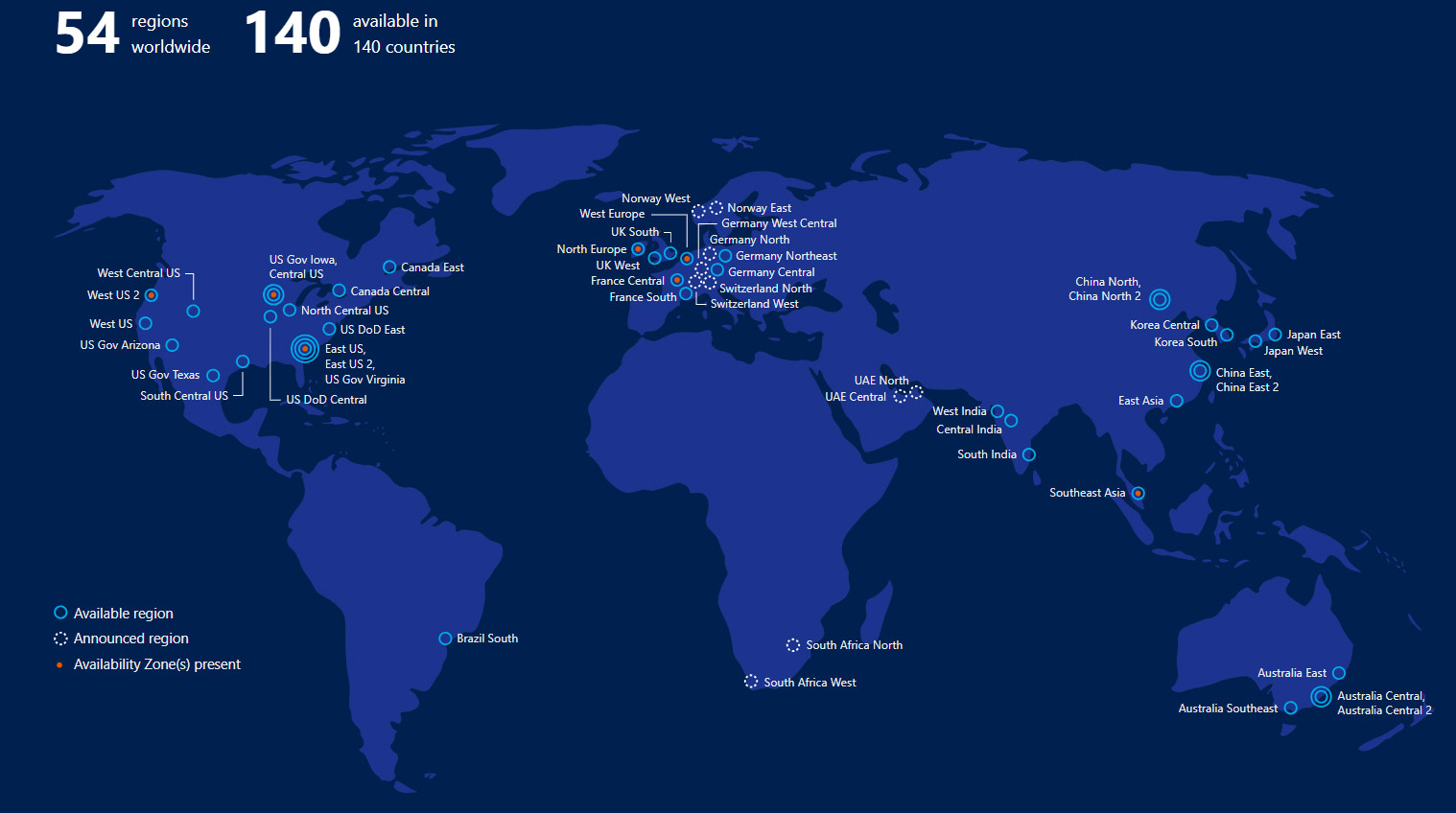
Office 365 data is stored in Microsoft Data Centers around the globe. The Microsoft global infrastructure is made up of Regions, Geographies, and Availability Zones.
- Regions – a set of data centers deployed within a latency-defined perimeter and connected through a dedicated regional low-latency network. With more global regions than any other cloud provider, Microsoft gives customers the flexibility to access data where they need to.
- Geographies – a discrete market, typically containing two or more regions that preserves data residency and compliance boundaries. Geographies allow customers with specific compliance needs to keep their data close. They are fault-tolerant to withstand region failure through the networking infrastructure.
- Availability Zones – physically separate locations within each region. Each zone is made up of one or more data centers equipped with independent power, cooling, and networking. Allos customers high availability and low-latency replication.
Microsoft has 54 regions worldwide and is available in 140 countries. The addresses of the data centers are not disclosed to help keep them secure.
How is the data stored?
The data is stored in the local Geographic location to the organization by default. There are two locations in each Availability Zone, so there are always two up to date copies at any one time. The customer can request to have the data moved to a different location, if required. In the event of a failure, the data is brought up to Production automatically, and another copied made within the Availability Zone. Microsoft makes it an available option (for Exchange Online and Microsoft OneDrive) to store the data in multiple Geographies, called Multi-Geo Replication. This would provide for four copies of the data, two in an Availability Zone in two Geographies.
Office 365 uses service-side technologies that encrypt the data at rest and in transit. For data at rest, Office 365 uses volume-level and file-level encryption. For data in transit, Microsoft uses multiple encryption technologies for communications between data centers and between clients and servers, such as Transport Layer Security (TLS) and Internet Protocol Security (IPsec). Office 365 also has an option for customer-managed security features.
Who Can Access customer data?
The Office 365 data belongs to the customer. They have complete control over it. Microsoft provides extensive privacy controls and visibility into where the data resides and who can get access to it. Microsoft takes strong measure to help protect the customer data from inappropriate access or use by unauthorized persons. This includes restricting access by Microsoft personnel and subcontractors, and carefully defining requirements for responding to government requests for customer data. However, you can access your own customer data at any time for any reason.
And, without further ado, a top 10 list from Microsoft themselves:
Top 10 Security and Privacy Features of Office 365
- Restrict physical data center access to authorized personnel and have implemented multiple layers of physical security, such as biometric readers, motion sensors, 24-hour secured access, video camera surveillance, and security breach alarms.
- Enable encryption of data both at rest and via the network as it is transmitted between a data center and a user.
- Do not mine or access your data for advertising purposes.
- Use customer data only to provide the service; we don’t otherwise look in your mailbox without your permission.
- Regularly back up your data.
- Will not delete all the data in your account at the end of your service term until you have had time to take advantage of the data portability that we offer.
- Host your customer data in-region.
- Enforce “hard” passwords to increase security of your data.
- Allow you to turn off and on privacy impacting features to meet your needs.
- Contractually commit to the promises made here with the data processing terms in your volume licensing agreement.
Links for follow-up:
Office 365 – Microsoft Trust Center
Microsoft Online Services Terms
Data Access – Microsoft Trust Center
Data Location – Microsoft Trust Center
Over the past decade, we have seen Microsoft evolve from the company that makes Windows to one of the top three tech giants, and the second largest cloud services provider behind only Amazon. While Microsoft has been a giant in the industry since the 80’s and 90’s, market share for their Windows operating system has been steadily declining during the rise of mobile devices.
Android and Apple have been slowly taking over the market and edging Microsoft out after a long string of flops. From Groove music, to the Windows phone, Microsoft has been releasing a series of not so great products that get overshadowed by others, and eventually phased out. There is one space they have been excelling in, cloud.
Focusing on the Cloud
With the success of Office 365 and Azure, it’s no surprise that Microsoft is shifting their focus to the cloud. It’s also no surprise that they are shifting the focus of their flagship product to be more in line with their current successes. There have been some major shakeups within the company over the last few years, one of which is to move the Windows operating system operations to the cloud division. Another act that solidifies Microsoft’s intent to bring Windows to the cloud.
Windows Virtual Desktop
Enter Windows Virtual Desktop. The newest iteration of Windows 10 is offered as a remote virtual desktop run in Azure and is accessible from anywhere. Just like every other cloud product MS offers, this means it will always be up to date. No more Windows updates restarting your computer at the most inconvenient times.
The biggest upside of Windows Virtual Desktop will definitely be its impact on IT departments. The fully virtualized OS will bring a lot of benefits with it that were previously only realized through server-based virtualization, which is costly and complicated.
Benefits of Windows Virtual Desktop
- Virtual Desktops will be able to share resources with other Virtual desktops
- Centrally managed through Azure
- Accessible from anywhere, eliminating a lot of networking headaches
- IT departments will be able to deploy new desktops easily and quickly while hardly needing to touch any actual hardware, making it scalable to meet the needs of any company.
- Built in Security and Compliance. Taking a load off any monitoring and protection software
The new virtual desktop will be bundled with Office 365, which will cut costs and ensure companies have everything they need to run in the cloud. The operating system runs on a pay-as-you-go model that Microsoft uses with most of its products.
There are several tiers of this model. Starting with the standard pay-as-you-go, where you can increase compute capacity and storage to fit your needs. You only pay for the virtual machines while they are on. There is also the option to reserve VM instances, which is a fixed price for the VM’s whether they are running or not. While still flexible, this requires a commitment for a length of time.
Redefining the Operating System
In an age of mobile devices, Microsoft is trying to redefine the operating system. They are taking it from a single-device system, to a multi device one. This will allow you to access the same desktop from any device, making it truly mobile.
Though it’s clear that Microsoft has been focusing on other projects, they aren’t leaving Windows by the wayside. The Windows Virtual Desktop may be more suited for business use, but it is a pretty clear indicator of where they want to OS to be in the future. There have been rumors that the next version of Windows will be the last. A single version of Windows that will continue to evolve, but you won’t need to upgrade to the next iteration.
Microsoft isn’t afraid to admit it’s made a few missteps in the last decade, like Windows 8 or the Windows phone. They know where they excel, and the focus has been shifted to cloud. Windows will be another addition to Microsoft’s suite of cloud services, bringing it into the future with the rest of the products that brought about Microsoft’s rise to the top. For almost its entire existence Microsoft has been known for Windows, but times are changing. Windows virtual desktop is a big step towards keeping Windows relevant in the future.
Do you have control of your Office 365 data? Do you have access to all the items you need?
The typical reaction is, “Microsoft takes care of it all.”
Microsoft takes care of quite a bit and provides a great service for their customers. However, Microsoft’s primary focus is on managing the Office 365 infrastructure and maintaining uptime to users. They are empowering YOU with the responsibility of your data. The misconception that Microsoft fully backs up your data on your behalf is quite common, and without a shift in mindset, could have damaging repercussions when this responsibility is left unattended. Ultimately, you need to ensure you have access to, and control over, your Exchange Online, SharePoint Online and OneDrive for Business data.
The misunderstanding falls between Microsoft’s perceived responsibility and the user’s actual responsibility of protection and long-term retention of their Office 365 data. The backup and recoverability that Microsoft provides and what users assume they are getting are often different. Meaning, aside from the standard precautions Office 365 has in place, you may need to re-assess the level of control you have of your data and how much access you truly have to it.
As a robust and highly capable Software as a Service (SaaS) platform, Microsoft Office 365 fits the needs of many organizations perfectly. Office 365 provides application Availability and uptime to ensure users never skip a beat, but an Office 365 backup can protect you against many other security threats.
6 reasons why backing up
Office 365 is critical
1. Accidental Deletion
If you delete a user, whether you meant to or not, that deletion is replicated across the network, along with the deletion of their personal SharePoint site and their OneDrive data. Native recycle bins and version histories included in Office 365 can only protect you from data loss in a limited way, which can turn a simple recovery from a proper backup into a big problem after Office 365 has geo-redundantly deleted the data forever, or it has fallen out of the retention period.
There are two types of deletions in the Office 365 platform, soft delete and hard delete. An example of soft delete is emptying the Deleted Items folder. It is also referred to as “Permanently Deleted.” In this case, permanent is not completely permanent, as the item can still be found in the Recoverable Items mailbox. A hard delete is when an item is tagged to be purged from the mailbox database completely. Once this happens, it is unrecoverable, period.
2. Retention Policy Gaps and Confusion
The fast pace of business in the digital age lends itself to continuously evolving policies, including retention policies that are difficult to keep up with, let alone manage. Just like hard and soft delete, Office 365 has limited backup and retention policies that can only fend off situational data loss and is not intended to be an all-encompassing backup solution.
Another type of recovery, a point-in-time restoration of mailbox items, is not in scope with Microsoft. In the case of a catastrophic issue, a backup solution can provide the ability to roll back to a previous point-in-time prior to this issue and saving the day.
With an Office 365 backup solution, there are no retention policy gaps or restore inflexibility. Short term backups or long-term archives, granular or point-in-time restores, everything is at your fingertips making data recovery fast, easy and reliable.
3. Internal Security Threats
The idea of a security threat suggests hackers and viruses. However, businesses experience threats from the inside, and they are happening more often than you think. Organizations fall victim to threats posed by their very own employees, both intentionally and unintentionally.
Access to files and contacts changes so quickly, it can be hard to keep an eye on those in which you’ve installed the most trust. Microsoft has no way of knowing the difference between a regular user and a terminated employee attempting to delete critical company data before they depart. In addition, some users unknowingly create serious threats by downloading infected files or accidentally leaking usernames and passwords to sites they thought they could trust.
Another example is evidence tampering. Imagine an employee strategically deleting incriminating emails or files — keeping these objects out of the reach of the legal, compliance or HR departments.
4. External Security Threats
Malware and viruses, like ransomware, have done serious damage to organizations across the globe. Not only is company reputation at risk, but the privacy and security of internal and customer data as well.
External threats can sneak in through emails and attachments, and it isn’t always enough to educate users on what to look out for — especially when the infected messages seem so compelling. Exchange Online’s limited backup/recovery functions are inadequate to handle serious attacks. Regular backups will help ensure a separate copy of your data is uninfected and that you can recover quickly.
5. Legal and Compliance Requirements
Sometimes you need to unexpectedly retrieve emails, files or other types of data amid legal action. Microsoft has built in a couple safety nets, (Litigation Hold) but again, these are not a robust backup solution capable of keeping your company out of legal trouble. For example, if you accidentally delete a user, their on-hold mailbox, personal SharePoint site and OneDrive account is also deleted.
Legal requirements, compliance requirements and access regulations vary between industries and countries, but fines, penalties and legal disputes are three things you want to avoid.
6. Managing Hybrid Email Deployments and Migrations to Office 365
Organizations that adopt Office 365 typically need a window of time to serve as a transition window between on-premises Exchange and Office 365 Exchange Online. Some even leave a small portion of their legacy system in place to have added flexibility and additional control. These hybrid email deployments are common yet pose additional management challenges.
The right Office 365 backup solution should be able to handle hybrid email deployments, and treat exchange data the same, making the source location irrelevant.
Conclusion
Whether you are considering moving your organization to Microsoft Office 365 or have already embraced the benefits of Office 365 within your organization, find a backup solution that offers you both complete access and complete control of your Office 365 data and avoid the unnecessary risks of data loss.
What Is EMS for Office 365?
In this mobile-first, cloud-first era, questions around security dominate the conversations about moving to the cloud. EMS provides an identity-driven security solution that offers a holistic approach to security challenges by not only protecting the organization but also identifying breaches before they cause damage.
How Do You Know If EMS Might Be a Fit for Your Organization?
As with most solutions, EMS is built to solve real problems that organizations are facing in order to help them be more efficient, productive, and secure. Below are some issues that many IT organizations face, and EMS is specifically built to address these problems:
- How to help users who have too many passwords to keep track of them all
- How to secure data across mobile devices
- How to manage BYOD
- How to ensure sensitive data is protected, even on users’ mobile devices
- How to create and enforce proactive threat protection
 How Does EMS for Office 365 Address These Issues?
EMS is a rather robust solution. However, in a nutshell, below is a list of the ways in which EMS addresses the organizational concerns listed above.
Identity Management
- Single Sign-On (SSO)
- Cloud applications
- Azure supports SSO for over 2,500 SaaS application
- On-Prem applications
- Using Microsoft Identity Manager
- Cloud applications
- Multi-Factor Authentication
- Provide users an extra layer of security – force users to prove their identity using password in a combination with mobile phone (app/text/email)
- Advanced Reporting
- Track SSO utilization and identify anomalies
- Self-Service Password Reset
- With write-back capabilities
- Users can reset their own passwords, reducing Help Desk calls
Mobile Device Management (MDM)
- Microsoft Intune
- Manage all mobile devices in the mobile ecosystem
- Utilize Mobile Application Management (MAM) without requiring devices to be enrolled
- Manage corporate data on user owned device
- Utilize the same Office Applications used on-prem
Information Protection – Formerly Called Rights Management
- Classify, label, and protect data
- Apply persistent protection which travels with the data
- Enable safe sharing
Identify Driven Security
- Microsoft Threat Advanced Analytics
- Protection from advanced targeted attacks by applying user and entity behavior analytics
If you find yourself facing any of these issues in your IT organization, I strongly suggest looking into EMS from Microsoft. We would be happy to walk you through any questions you might have about the solution or talk about how it could improve your specific environment. Contact us today.
What Is EMS for Office 365?
In this mobile-first, cloud-first era, questions around security dominate the conversations about moving to the cloud. EMS provides an identity-driven security solution that offers a holistic approach to security challenges by not only protecting the organization but also identifying breaches before they cause damage.
How Do You Know If EMS Might Be a Fit for Your Organization?
As with most solutions, EMS is built to solve real problems that organizations are facing in order to help them be more efficient, productive, and secure. Below are some issues that many IT organizations face, and EMS is specifically built to address these problems:
- How to help users who have too many passwords to keep track of them all
- How to secure data across mobile devices
- How to manage BYOD
- How to ensure sensitive data is protected, even on users’ mobile devices
- How to create and enforce proactive threat protection
How Does EMS for Office 365 Address These Issues?
EMS is a rather robust solution. However, in a nutshell, below is a list of the ways in which EMS addresses the organizational concerns listed above.
Identity Management
- Single Sign-On (SSO)
- Cloud applications
- Azure supports SSO for over 2,500 SaaS application
- On-Prem applications
- Using Microsoft Identity Manager
- Cloud applications
- Multi-Factor Authentication
- Provide users an extra layer of security – force users to prove their identity using password in a combination with mobile phone (app/text/email)
- Advanced Reporting
- Track SSO utilization and identify anomalies
- Self-Service Password Reset
- With write-back capabilities
- Users can reset their own passwords, reducing Help Desk calls
Mobile Device Management (MDM)
- Microsoft Intune
- Manage all mobile devices in the mobile ecosystem
- Utilize Mobile Application Management (MAM) without requiring devices to be enrolled
- Manage corporate data on user owned device
- Utilize the same Office Applications used on-prem
Information Protection – Formerly Called Rights Management
- Classify, label, and protect data
- Apply persistent protection which travels with the data
- Enable safe sharing
Identify Driven Security
- Microsoft Threat Advanced Analytics
- Protection from advanced targeted attacks by applying user and entity behavior analytics
If you find yourself facing any of these issues in your IT organization, I strongly suggest looking into EMS from Microsoft. We would be happy to walk you through any questions you might have about the solution or talk about how it could improve your specific environment. Contact us today.
Studies show that employees are increasingly using their personal devices for more than personal use.
- 66% of employees use personal devices for work purposes.
- 52% of information workers across 17 countries report using three or more devices for work.
- 90% of enterprises will have two or more mobile operating systems to support in 2017.
- 80% of employees admit to using non-approved SaaS applications in their jobs.
So, how do we keep all of these devices secure when they’re working with corporate information?
When you combine Office 365 with the Enterprise Mobility Suite, you give employees the freedom to work securely from virtually anywhere, on any device, with the gold standard of productivity tools: O365.
- Enhance employee productivity in the office or on the road with reliable access to mobile apps, tools, and data.
- Keep sensitive data protected without the need for complex security configurations.
- Seamlessly manage employee devices, apps, and data through one simple IT admin portal.
- Give remote workers access to the familiar Office apps and productivity tools they love.
Maximize productivity with the combined benefits of Microsoft Enterprise Mobility Suite + Office 365
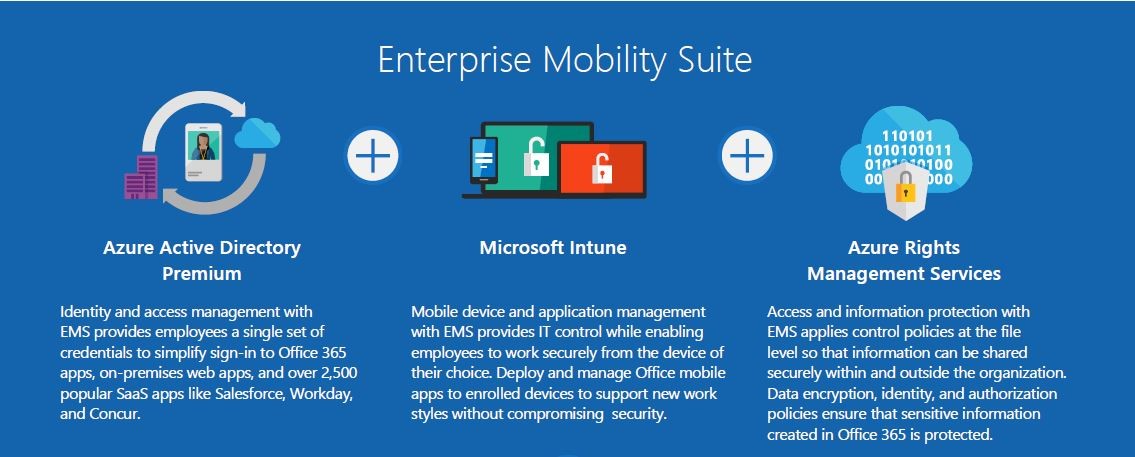
 The Enterprise Mobility Suite (EMS) is the only comprehensive cloud solution that can manage identities, devices, apps, and data. EMS includes three products: Microsoft Azure Active Directory Premium, Microsoft Intune, and Microsoft Azure Rights Management Services.
Office 365 is a cloud-based service that provides users with access to industry-standard Office productivity apps like Word, PowerPoint, Excel, Publisher, and Outlook from any location with a secure internet connection. Office 365 is designed for employees who want the flexibility to take their work with them, wherever they go, without sacrificing the user experience.
Together, the EMS + Office 365 suite offers a complete managed mobile productivity solution that enables your users with the gold standard of productivity and deeply integrated protection for company data.
Synchronized identity management
Improve employee productivity with single sign-on to Office mobile apps, over 2,500 popular SaaS apps, and on-premises web apps. Enable self-service options to allow users to manage groups, passwords, devices, and apps, reducing the need for IT troubleshooting assistance. Now your employees have access to the information, tools, and intuitive Office 365 apps they need, whenever they need it.
Mobile app and device management
Empower BYOD with secure device management that ensures even personal devices are protected and compliant. Deploy the Office mobile apps so that every enrolled device becomes a powerful work tool. Now your employees can work with the Office 365 apps they know, from the devices they love.
Help protect sensitive information
Protect corporate data by allowing more secure access to company resources and enable safe sharing of sensitive information inside and outside of your organization. Easily apply encryption policies at the file level that follow the file within your organization and outside of your organization. Now your data is protected anywhere—even on the go.
Key Business Benefits of Enterprise Mobility Suite + Microsoft Office 365
- Give employees the best productivity experience wherever they happen to be working.
- Unburden your IT department by eliminating typical incompatibility and user experience issues with a simplified user management system.
- Increase business agility by sharing data securely with intended recipients, and completely on your own terms.
Colorado Business Owners – Minimize IT Brain Damage in 2017
I am the founder, CEO, and majority owner of an IT Solutions Company (Zunesis, Inc.) headquartered in the great state of Colorado. I am so grateful for the success we have had over the years and also for the many fellow employees who have shaped, guided, and enabled Zunesis to prosper. I also have a high level of respect for other small business owners because I know the depth of challenges, decisions, and conflict they face.
I recently read an article that stated that less than 20% of all Microsoft Office licenses were provided through the Microsoft Cloud. This was a shocking statistic to me. If you are a small business owner (10-250 employees), why would you not migrate to O365?
 We made the decision in 2009 to migrate to Office 365, and that has turned out to be a fantastic decision. Trust me, fellow small business owners, migrating to and using Office 365 is easy and straight forward. You never have to worry about your managed services provider going out of business or about your trusted IT guy or gal finding something better. I can also tell you that using Office 365 instead of our own internal staff have freed my employees up to serve our customers and not be stuck fixing our own IT stuff.
Financially, I am also happy with our decision to move to Office 365. When I consider the improved up-time and productivity for my employees, the dollars spent are well worth it. I also have this hunch that the overall security of my business is in better hands, than my team trying (on the side of their regular jobs) to make sure every application is properly patched, updated, and protected.
Full disclosure: Yes, Zunesis is an IT Solution Provider; and, yes, we specialize in helping small and large organizations migrate to Office 365 and Azure; however, our passion for doing this all began with the VALUE we received in 2009 when we made the decision to implement Microsoft Office 365 for ourselves.
If you would like to minimize brain damage in 2017, do what we did in 2009 and consider migrating your business to Office 365. Your quality of life will improve substantially! I hope you have a wonderful 2017.
